Why a KDE global theme installed via 'Get New Stuff' only half-applies (+ the Kvantum fake-success trap)
Environment: Kubuntu 26.04 LTS · KDE Plasma 6 · Kvantum (qt-style-kvantum)
TL;DR
A KDE Global Theme is split into six pieces (colors, icons, cursor, window decoration, desktop theme, widget style), and "Get New Stuff" isn't guaranteed to push all of them into your system settings. Set the ones that didn't take with kwriteconfig6, and know that for the widget style (Kvantum), enabling the engine (widgetStyle=kvantum) is separate from picking a sub-theme.
The symptom: two of the six pieces applied
The user installed and applied We10XOS-dark via System Settings → Appearance → Global Theme → "Get New Stuff," but it looked only half-changed to them. Comparing the screen they sent with the actual config files, only two of the six pieces the theme asks for had applied.
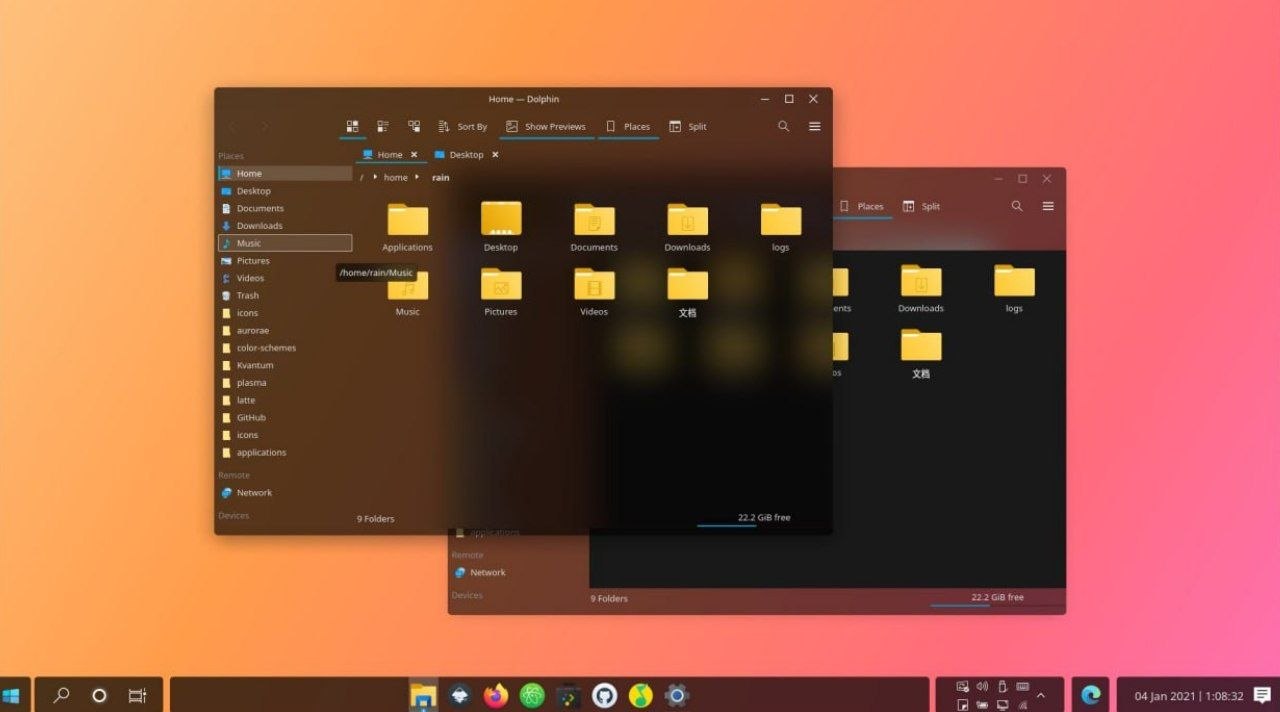
(That image isn't the user's screen — it's the example screenshot from the We10XOS-dark theme's own "Get New Stuff" listing, shown here as a reference for how the theme looks when fully applied.)
Diagnosis: this theme asks for six pieces
Opening the theme package's contents/defaults shows what it actually wants:
[kcminputrc][Mouse]      cursorTheme=Win10OS-cursors
[kdeglobals][General]    ColorScheme=We10XOSDark
[kdeglobals][Icons]      Theme=We10X
[kdeglobals][KDE]        widgetStyle=kvantum
[kwinrc][org.kde.kdecoration2]  theme=__aurorae__svg__We10XOS-dark
[plasmarc][Theme]        name=We10XOS-dark
But in the real config files, only colors (ColorScheme) and icons (Icons) had applied — cursor, window decoration, desktop theme, and widget style were all still default. "Get New Stuff" installs the package, but sometimes only pushes some of it into the live settings.
Fix 1: three of them already had files on disk — they just needed re-selecting
Cursor, window decoration, and desktop theme already had their files on disk (~/.local/share/plasma/desktoptheme/…, ~/.local/share/aurorae/themes/…, etc.) — they just weren't "selected" in the settings. I wrote them in directly with kwriteconfig6.
kwriteconfig6 --file kcminputrc --group Mouse --key cursorTheme Win10OS-cursors
kwriteconfig6 --file kwinrc --group "org.kde.kdecoration2" --key library org.kde.kwin.aurorae
kwriteconfig6 --file kwinrc --group "org.kde.kdecoration2" --key theme __aurorae__svg__We10XOS-dark
kwriteconfig6 --file plasmarc --group Theme --key name We10XOS-dark
Window decoration applies immediately with qdbus6 org.kde.KWin /KWin reconfigure, but cursor, desktop theme, and widget style only fully apply after a re-login.
Fix 2: the widget style (Kvantum) has to be installed from scratch
Kvantum wasn't installed at all. The package name is a trap too — on Ubuntu 26.04 it's not kvantum but qt-style-kvantum.
sudo apt install qt-style-kvantum qt-style-kvantum-themesAnd the We10XOS-dark Kvantum sub-theme isn't in the "Get New Stuff" package — it lives separately in the author's GitHub repo (yeyushengfan258/We10XOS-kde). Clone it, grab the Kvantum folder, install.
git clone https://github.com/yeyushengfan258/We10XOS-kde.git
mkdir -p ~/.config/Kvantum
cp -r We10XOS-kde/Kvantum/We10XOS-dark ~/.config/Kvantum/

# 1. pick the sub-theme Kvantum's engine should use
kwriteconfig6 --file ~/.config/Kvantum/kvantum.kvconfig --group General --key theme We10XOS-dark

# 2. tell the system to use the Kvantum engine at all
kwriteconfig6 --file kdeglobals --group KDE --key widgetStyle kvantum
Those two lines do different jobs. Run only the first and you've picked a sub-theme for an engine nothing is using; run only the second and the engine is on but stuck with its default sub-theme. You need both — and that distinction is exactly the trap in the next section.
The misdiagnosis: don't trust Kvantum Manager saying "applied"
Here's the real trap. Kvantum Manager showed "Active theme: We10XOS-dark" at the bottom, and I took that as "done." That was wrong.
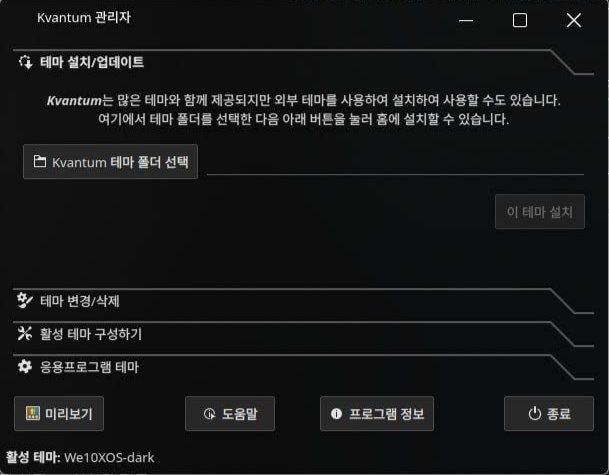
Why: Kvantum Manager's "active theme" only decides which sub-theme the Kvantum engine uses. Separately, whether apps use the Kvantum engine at all is a system setting (widgetStyle in kdeglobals) — and checking it, it had reverted at some point from kvantum to Windows (Qt's built-in style). Most likely the "Windows" entry in System Settings' Application Style list got clicked by mistake, confused with the theme name (We10XOS = "Windows 10").
kwriteconfig6 --file kdeglobals --group KDE --key widgetStyle kvantumSo to check the widget-style state, look at both Kvantum Manager's active theme and whether System Settings → Application Style is set to "Kvantum."
Takeaways / checklist
- A KDE Global Theme is six pieces, and "Get New Stuff" isn't guaranteed to apply them all — verify each by eye after a re-login.
- Kvantum's "pick a theme" and "enable the engine" are separate settings. If the widget style looks off, check both Kvantum Manager and System Settings' Application Style.
- On Ubuntu 26.04 the Kvantum package is
qt-style-kvantum(+qt-style-kvantum-themes).