Dual-boot clock off by exactly your UTC offset? Why `timedatectl set-local-rtc 1 --adjust-system-clock` made it worse
Environment: Kubuntu 26.04 LTS · KDE Plasma 6 · dual-booting Windows 11 (two physically separate NVMe drives) · AMD Ryzen (Zen5) + NVIDIA RTX 40
TL;DR
If your clock is off by exactly your UTC offset after a Windows/Linux dual-boot (9 hours here, since KST is UTC+9), the two OSes are interpreting the hardware clock (RTC) differently. Put both of them on UTC and it's done.
On Linux:
sudo timedatectl set-local-rtc 0On Windows (elevated PowerShell):
New-ItemProperty -Path "HKLM:\SYSTEM\CurrentControlSet\Control\TimeZoneInformation" `
  -Name RealTimeIsUniversal -Value 1 -PropertyType QWord -Force
Then toggle "Set time automatically" off and on in Windows settings.
The fix you'll find most often — sudo timedatectl set-local-rtc 1 --adjust-system-clock — can actually jump your Linux clock further out of sync. Here's why.
The symptom
This was right after installing Kubuntu on a fresh SSD, set up to dual-boot Windows from a second, separate drive. The user booted into Windows and reported the time was off by exactly 9 hours. Fix the clock on Linux and Windows was wrong; fix it on Windows and Linux was wrong.
This is the classic dual-boot symptom, so the cause was easy to name:
- Windows reads the hardware clock (RTC, the motherboard clock) as local time by default.
- Linux reads it as UTC by default.
- So when Linux writes a UTC value into the RTC, Windows reads that same number as local time and lands exactly one UTC offset off — 9 hours here.
The misdiagnosis: my first fix broke the clock further
I had the direction right, but the fix I reached for first was wrong. I suggested the command you'll see repeated all over the web:
timedatectl set-local-rtc 1 --adjust-system-clockThe reasoning was "make Linux read the RTC as local time too, so both OSes agree." That's a legitimate direction in principle — both-on-local-time is one valid answer. But when the user ran it, the screenshot they sent back showed the Linux system clock itself had jumped 9 hours backwards. Now the thing I was trying to fix was broken in a second way. This was a misdiagnosis.
And on the same screen, systemd was already warning against exactly this:
Warning: The system is configured to read the RTC time in the local time zone.
This mode cannot be fully supported. It will create various problems with time
zone changes and daylight saving time adjustments. ... it is recommended to use
RTC in UTC by calling 'timedatectl set-local-rtc 0'.
systemd itself was telling me the local-RTC mode isn't fully supported and to use UTC. So not only did my fix jump the clock — it was steering into a mode the tool actively discourages.
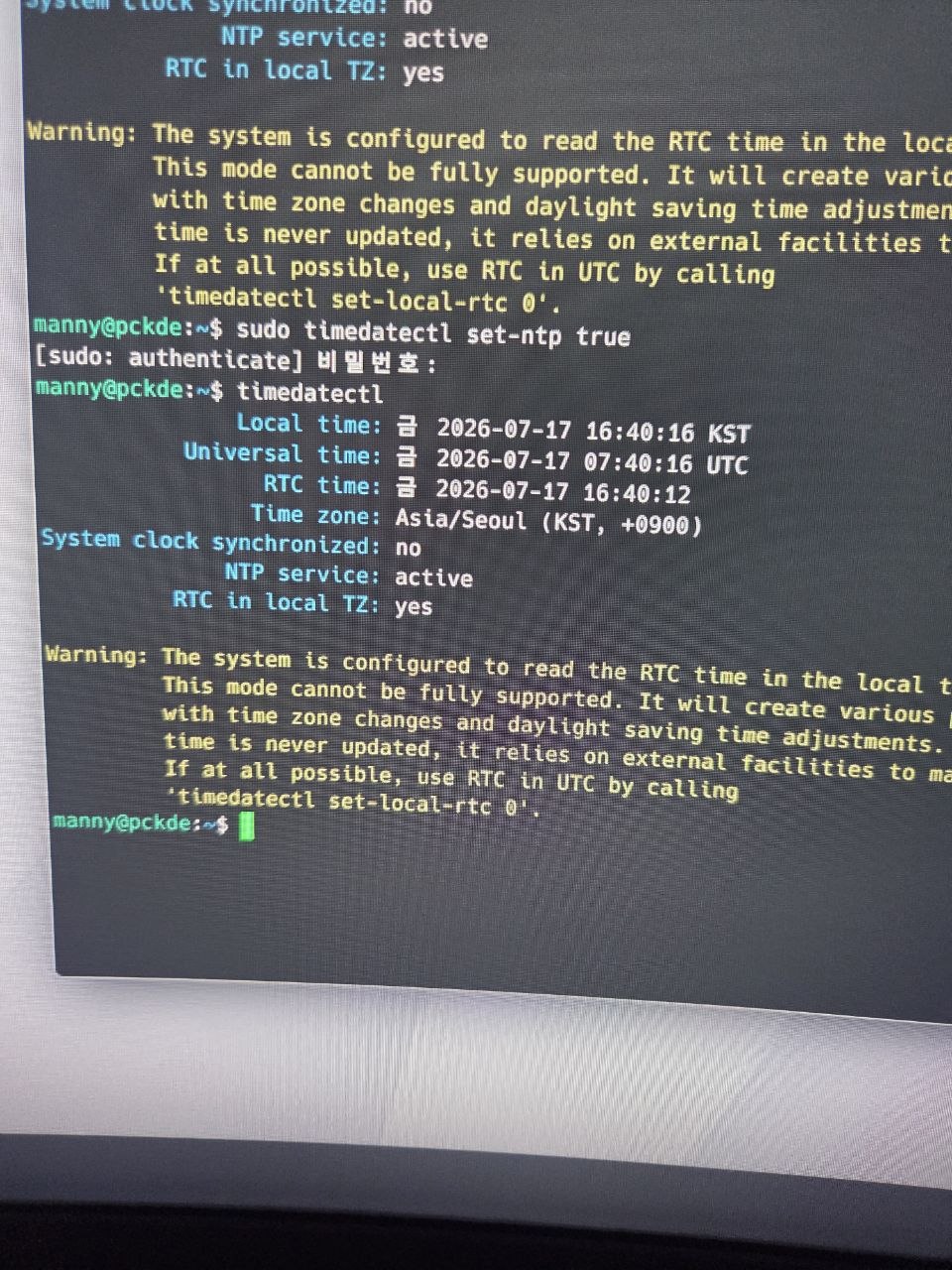
This was the state the user sent back: under systemd's warning sit RTC in local TZ: yes (the clock pushed into local-RTC mode) and System clock synchronized: no (not yet synced).
Root cause
The whole thing hinges on what --adjust-system-clock actually does.
set-local-rtc changes how the number stored in the RTC is interpreted — as UTC, or as local time. Add --adjust-system-clock and you tack on one more instruction:
Leave the number in the RTC as-is, and move the system clock to match that number.
At that moment the RTC held a UTC value that Linux had written — say 04:38. Running the command reinterprets that 04:38 as "local time from now on" and drags the system clock down to 04:38. Local time should have been 13:38 (UTC+9), so the clock fell back by exactly 9 hours.
Had I run set-local-rtc 1 without --adjust-system-clock, it would have kept the system clock where it was and rewritten the RTC with local time instead — no jump. That one flag flips the whole thing between "keep the current wall-clock time" and "keep the RTC number."
So there were two layers to the problem:
- The RTC interpretation was mismatched between the two OSes, giving the 9-hour gap, and
- the
--adjust-system-clockI added to fix it dragged the clock the wrong way, because I didn't know which convention the RTC number was already stored in.
The fix: put both OSes on UTC
I dropped the local-RTC approach — systemd warns about it for a reason — and went the standard, clean way: both OSes interpret the RTC as UTC.
Linux (put the RTC back to UTC):
sudo timedatectl set-local-rtc 0Windows (make it read the RTC as UTC via a registry value, elevated PowerShell):
New-ItemProperty -Path "HKLM:\SYSTEM\CurrentControlSet\Control\TimeZoneInformation" `
  -Name RealTimeIsUniversal -Value 1 -PropertyType QWord -Force
Then I asked the user to toggle "Set time automatically" off and on (or hit "Sync now") in Windows settings to snap the displayed time back.
Undoing the clock that already jumped
The catch: the misdiagnosed fix had already left the Linux clock 9 hours behind. set-local-rtc 0 corrected the interpretation to UTC, but NTP didn't re-sync the clock right away. Even after set-ntp true, the status the user read back still said System clock synchronized: no for a while.
So I asked the user to turn NTP off, set the time manually, and turn it back on:
sudo timedatectl set-ntp false
sudo timedatectl set-time "YYYY-MM-DD HH:MM:SS"   # put in the actual local time
sudo timedatectl set-ntp true
Verifying
In the timedatectl output the user sent afterward, two lines confirmed it:
RTC in local TZ: no— back to interpreting the RTC as UTC.System clock synchronized: yes— NTP had caught the clock again.
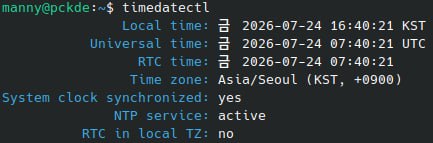
The tell is that RTC time now reads the same value as Universal time (07:40:21 UTC in the shot above) — meaning the RTC is stored in UTC — and the systemd warning from the misfire is gone.
Booting into Windows showed the correct time too, and rebooting back and forth between the two no longer drifted. With both OSes sharing the same UTC reference, neither has any reason to disturb the other's clock.
Takeaways / checklist
- A dual-boot clock that's off by exactly your timezone offset (9 hours for Korea) is almost always an RTC interpretation mismatch (UTC vs local).
- Both "both-on-local" and "both-on-UTC" work, but since systemd warns about local-RTC, both-on-UTC is the cleaner choice — and it's the safe one if your region observes DST.
- Don't casually add
--adjust-system-clocktotimedatectl set-local-rtc. It means "keep the RTC number and move the system clock to it," so if you don't know which convention the RTC is currently stored in, it can jump your clock wholesale. - If NTP won't re-sync after a correction (
System clock synchronized: no), force it:set-ntp false→set-timemanually →set-ntp true.
Related
This clock bug was the last thing to blow up while setting up a two-disk dual boot — Kubuntu on a fresh SSD next to Windows. The full install (tiny installer text on QHD, the fear of wiping the wrong disk, an RDSEED warning, a Minimal install with no browser) is written up in Installing Kubuntu 26.04 alongside Windows on a second SSD — the beginner traps I walked us through.